Karatrack

Professional Karaoke Hosting Software

Karatrack+AI

Run the show. Don't let it run you.

Karatrack+AI is the next generation of karaoke hosting software, designed for professional KJs, venues, and high-volume shows. Built with advanced automation, intelligent singer management, powerful media tools, and deep integration across the Karatrack product suite, Karatrack+AI helps hosts run smoother, faster, and more organized shows.

Windows only

Karatrack+AI is a Windows desktop application for Windows 10 and Windows 11. It is not available for macOS, Linux, ChromeOS, tablets or phones. View minimum requirements
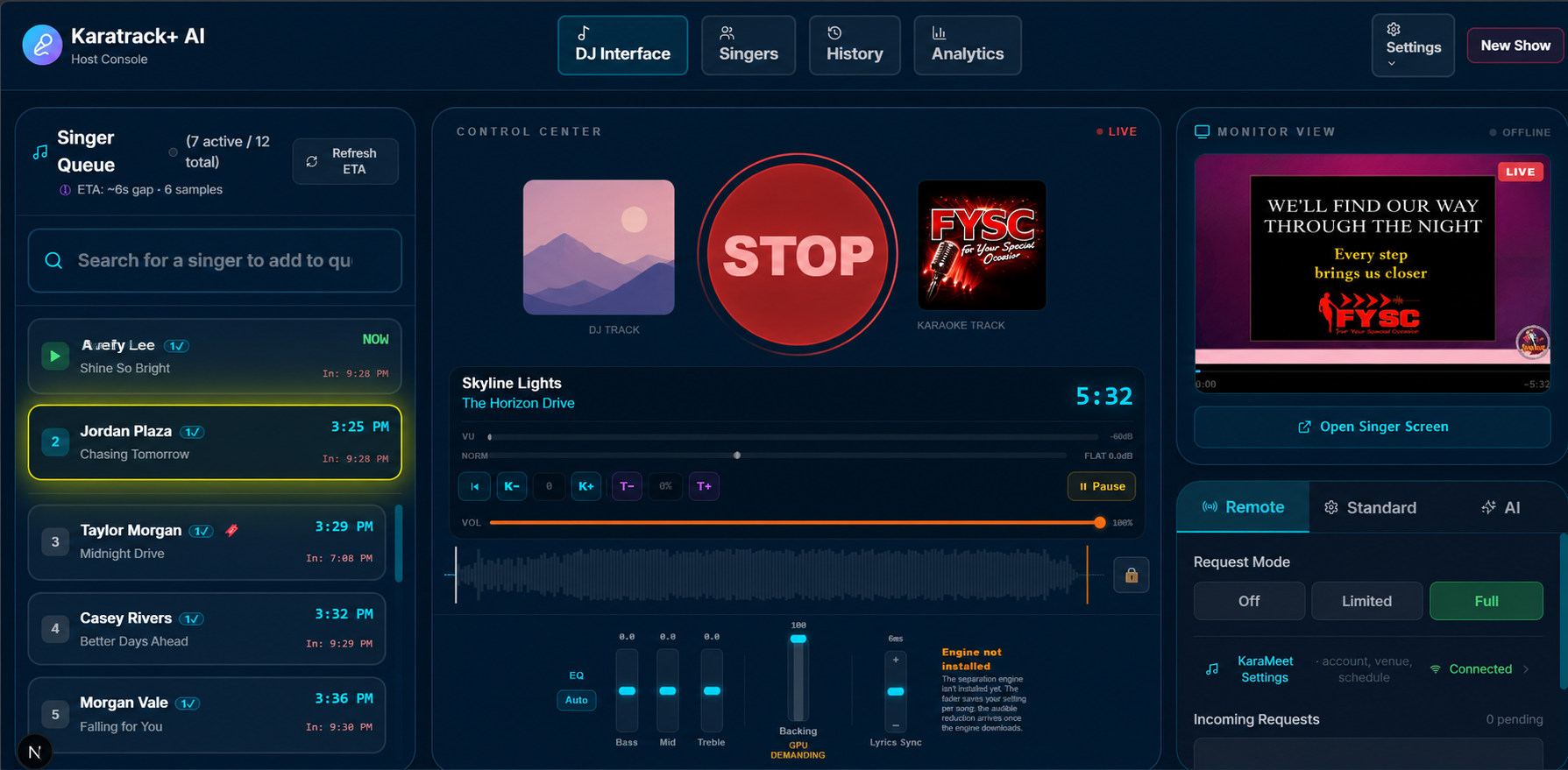
Host Interface

Advanced Karaoke Hosting Tools

Karatrack+AI is built to handle real-world karaoke shows with speed, control, and intelligence.

Professional Karaoke User Interface

A clean, modern hosting interface designed to keep the show moving.

Singer Profile Management

Helps prevent duplicate singer profiles by combining singer history and activity into one organized record.

Duplicate Song Submission Control

Choose whether singers can submit the same song multiple times with a simple on/off setting.

Group Singer Support

Keep couples, duos, and groups together in rotation so singers are not accidentally inserted between them.

Auto EQ, Silence Detection & Volume Normalization

Smart audio tools keep tracks consistent from singer to singer. Lighten or remove backing vocals on the fly, and change key or tempo — all saved to the singer's history.

Smart ETA Tracking

Uses track length to estimate when upcoming singers are likely to perform.

Karaoke Album Art Support

Display manufacturer artwork or album art when paired with Karatrack Library Manager.

Singer History Export & Import

Easily back up, transfer, and restore singer histories between systems.

Track Metadata Display

Show useful details such as genre, release year, and lyric rating directly on karaoke tracks.

Quick Lyrics & Release Year Tools

Fast-access buttons make it easier to check lyrics and track release years during search.

Full Show Analytics

Track valuable performance data, including busiest shows, busiest days of the week, singer activity, and more.

Disc Change Exporting

Export manual track changes directly to Karatrack Library Manager for physical disc and library updates.

Rotation Control That Explains Itself

A live rotation is the most visible part of your show. Karatrack+AI keeps it fair, tells you why it did what it did, and lets you undo a mistake.

Smart Rotation

Protects the on-deck spot, keeps linked singers together, and skips inactive singers automatically. Prefer a simpler rotation? Turn it off with one tick.

Rotation Marker

Mark where the current round ends so new singers are placed fairly, without jumping ahead of people who are already waiting.

Restore Rotation

Called the wrong singer? Roll the queue back to the way it was. Restore points are created as singers are called and kept for 15 minutes.

Rotation Notes

When a singer lands somewhere unexpected, a red ? on their card explains why in plain words. You can hide the notes whenever you like.

Auto-Remove Inactive Singers

Optionally clear singers out of the rotation after a set number of minutes of inactivity. The singer on stage is never removed.

One or Two Songs Per Turn

Let each singer perform one or two songs in a row. Wait-time estimates adjust automatically.

Quick Add

Add a new singer and their first song in one short step.

Change Song Without Losing a Spot

Swap a singer's song, start their next queued song, or skip their turn from one menu. Their place in the rotation is kept.

You Decide What Happens After Each Song

Choose how singers are handled once they have sung, including a Do Nothing mode that leaves them exactly where they are.

Quick Singer Search

Find anyone in the rotation by name, or by a song they have queued, and see their spot and estimated wait.

Who Sang That Song?

Look up every singer who has performed a song, how many times, and when they last sang it. Filter by venue.

Detailed Singer History

See the exact date each song was last sung, with the key and tempo used. Export any singer's history to a spreadsheet-ready CSV file.

Combine Duplicate Singers

Merge two profiles for the same person without losing their history or their photo.

Save & Load Entire Shows

Save a show under a name, including its look, rotation and request settings, DJ playlist, and singers, then load it again for your next night at that venue.

New Show Reminder

On a new karaoke night, Karatrack+AI offers to start a fresh show so last night's rotation is not reused by mistake.

The Right Song, in the Right Key

Tools for finding the right version fast and making every singer sound their best.

Key & Tempo Control

Change the key, and speed a track up or slow it down by as much as 15%. Each singer's choices are remembered for next time.

Song Key Detection

Karatrack+AI can analyze your library and detect each track's musical key. Run it overnight in the background, and only new tracks need analyzing later.

Search by Key

Filter your karaoke library by musical key to find songs that suit a singer's voice.

Switch Versions, Even Mid-Song

Change to another version of the same song with one click. The singer keeps their place, key, and tempo, even during a performance.

Preferred Version

Tick the version of a song you like best and it is chosen first for host, Karameet, and Karakiosk requests. A singer's own choice always wins.

Headphone Preview

Listen to any song or version in your headphones before it plays, without sending it to the room. Requires a separate headphone output.

"Did You Mean…?" Search

Typed it wrong? When nothing matches exactly, Karatrack+AI suggests the closest artists and titles.

Surprise Me

Pick a random song for an adventurous singer. Turn on History Suggestions and it draws from the artists, genres, and decades that singer usually chooses, skipping songs they have already sung.

Duet Tags

Mark songs as duets. The duet badge shows in search, history, and the queue, and you can search for duets directly.

Artist Name Clean-Up

Show artists as "First Last" or "Last, First" consistently, and find both spellings in one search. Your files are never renamed.

Track Length Everywhere

See how long each song runs in search results, history, queued songs, version lists, and rotation cards.

Automatic Video Conversion

Older video files that Windows cannot play are detected and converted when you import them.

DJ Interface

Karatrack+AI also includes a powerful DJ interface for managing music between singers, hosting events, and keeping the energy up all night.

Build, Save, Load & Append Playlists

Create custom playlists and quickly bring them back when needed.

Genre, Year & Lyric Rating Tools

Label tracks automatically with Karatrack Library Manager or manually inside the DJ interface.

Genre-Based Search

Quickly find the right track for the room by searching your music by genre.

Custom In & Out Points

Save start and end points for tracks so songs begin and end exactly where you want them.

Favorites Side List

Keep go-to songs, crowd favorites, and emergency fillers ready at all times.

Album Art & Track Information

View artwork and important song details directly inside the DJ interface.

Auto Fade, Shuffle & Playback Controls

Includes the DJ features you expect, built directly into the Karatrack+AI workflow.

Playlist Protection

Problem tracks are handled safely so they do not lock up the entire playlist.

Fuzzy Search

Find tracks fast by typing any part of the artist name or song title.

True Crossfade

The next track comes in over the top of the outgoing one, the way a DJ would mix it.

Filler Music Fade-In

Start your filler music a chosen number of seconds before the karaoke track ends, so there is never dead air.

Add a Whole Folder

Add an entire folder of music or videos to a playlist in one click, up to 2,000 tracks at a time. Duplicates are skipped.

Full-Window Playlist Builder

Expand Search & Playlist to fill the whole DJ window when you are building a big set.

Music Video Mode

Keep a separate music video library and playlist. Videos play on the Singer Screen, with the picture fading in step with the audio.

Photo Slideshow

Show a folder of photos on the Singer Screen between singers, with your choice of timing and transitions. It pauses during performances.

Search Online

Track not in your library? One click searches the web for what you typed, using the search link you choose.

Put On a Bigger Show

Karatrack+AI drives the screens and sounds your audience sees and hears, not just the karaoke track.

Singer Screen

A dedicated second display for the room, showing the karaoke video, artwork, who is up next, and a scrolling banner.

Singer Photos

Show a singer's photo when they are called up. Add photos yourself or accept them from the Karameet app. Nothing appears on screen until you approve it.

Showtime Countdown

Count down to showtime on the Singer Screen, then flash SHOWTIME! when the clock hits zero. Change the wording and colors, or use your own image.

Promo Screen

Open a third window for promotions, with a slideshow that runs all night and an optional scrolling banner. Ideal for a venue TV.

Custom Image Buttons

Twelve buttons put your own full-screen images on the Singer Screen between singers: drink specials, house rules, upcoming events.

Shout Outs

Drop a one-night message such as a birthday or a welcome into the scrolling banner in seconds.

Sound FX Board

A board of instant sound effects with built-in sounds you can replace with your own. Filler music lowers automatically while an effect plays.

Video Bits

Fire images, animations, and short videos with sound onto the Singer Screen from a 12-button drawer. Supports GIF, PNG, WebP, WebM, and MP4.

Song Trivia

Click the album art to pull up facts about the song and artist, ready to share on the mic.

Holidays & Fun Days

See upcoming public holidays for the countries you choose, plus fun novelty days, up to 30 days ahead. Never run out of things to talk about.

Tips QR Codes

Show QR codes for Venmo, Cash App, PayPal, and other payment services so walk-up singers can tip you. The codes are generated on your computer and work offline.

Default Artwork

Choose the image shown for karaoke and DJ tracks that have no artwork. Saved separately for each venue.

A Console Built for Real Venues

Make It Yours

Change backgrounds, glow colors, card colors, transparency, and blur to match your brand or the venue.

True Full-Screen Mode

Hide the Windows taskbar for a dedicated host view. A clock stays visible so you always know the time.

Screen Lock

Stepping away from the booth? Lock the console with a pattern. The music, the Singer Screen, and the Stage Host remote keep working while it is locked.

Stage Host Remote

Give a second presenter a phone or tablet page showing who is Up Now, Next Up, and On Deck, with GO, STOP, PAUSE, RESTART, and skip controls. It connects over the venue Wi-Fi, and a new PIN is created for every show.

Remote Host: Run the Show from a Tablet

Walk the room and still run the show. Remote Host puts the rotation on a tablet or any browser on the venue Wi-Fi: add singers, search your library and add songs, change key and tempo, answer song requests, and press GO, STOP, PAUSE, RESTART, Skip, or Change Song. Each tablet needs the show PIN and a one-time approval on the host computer. Included at no extra cost.

Mini Kiosk: Singers Sign Up on Any Touch Screen

Hand a tablet to the singer and let them do the typing. Mini Kiosk is a simple sign-up page for any touch screen with a web browser on the venue Wi-Fi: singers type their name, search your library, add their own songs and put them in order. No KaraMeet account and no internet needed. Add one extra language button for your crowd. Included at no extra cost.

Singer Arrival Forecast

Analytics uses your past shows to estimate when singers arrive, in 30-minute windows, so you know when the rush is coming.

More Than Karaoke Software

Karatrack+AI is packed with advanced tools designed to solve the everyday problems professional hosts deal with during live shows. From singer management and rotation control to metadata, analytics, DJ playback, and smart automation, it is built to make your show more reliable, more organized, and more impressive.

There are many more features inside Karatrack+AI than we can list here — and that is exactly the point.

Built for a Connected Karaoke Suite

Karatrack+AI supports 13 language settings, making it flexible for hosts and venues around the world. The software can operate on its own, but it reaches its full potential when paired with:

Karatrack Library Manager

For organizing your library, managing metadata, album art, lyric ratings, genre, year, and disc changes.

Karameet Pro

For enhanced singer interaction, show discovery, mobile tools, and connected audience features.

Connected Requests & Add-Ons

Optional tools that connect your show to singers' phones, your website, and more. Turn on only what you need.

Missing-Song Requests

When a singer asks for a song you do not have, a Song Needed alert appears on your screen with a quick way to search for a match. Find it, or mark it unavailable.

Accept & Decline Messages

Singers see a confirmation when a request is accepted and a reason when it is declined. You can write your own messages.

Queue Sync

Songs you add at the booth appear in the singer's Karameet queue once they check in under the same name.

Karaoke Version Store

An optional add-on that shows tracks available to buy from Karaoke Version under your search results. Buy the track on their site, and Karatrack+AI detects the download, adds it to your library, and can add it to the singer who asked. Availability varies by country.

Casino Night

A free-to-earn prize game for your venue. Singers earn stars for things like checking in, then spin a slot machine or scratch a ticket in the Karameet app for prizes you choose. You set the prizes and the odds, get an alert for every win, and track redemptions. Local promotional-game rules apply.

Website Songbook

Publish your library to a searchable songbook that you can put on your own website through Karameet.

Minimum System Requirements

The minimum specs to run Karatrack+AI smoothly. A faster processor, more memory and an SSD make everything snappier, especially with large libraries.

Operating systemWindows 10 (64-bit, version 1909 or later) or Windows 11
ProcessorIntel Core i5 / AMD Ryzen 5 or better
Memory8 GB RAM
Storage2 GB free disk space for the app, plus space for your music library (SSD recommended)
Display1920 × 1080 display; a second display output for the singer screen
GraphicsAny graphics card for hosting; NVIDIA graphics card with CUDA for on-the-fly vocal removal (see note below)
AudioSound card or USB audio interface
InternetInternet connection for activation and updates; live features such as Karameet and Karakiosk song requests need internet during the show

On-the-fly vocal removal requires an NVIDIA graphics card with CUDA support — GeForce GTX 1060 (6 GB) or newer recommended, with current NVIDIA drivers. Every other Karatrack+AI feature runs without a dedicated graphics card.

Frequently Asked Questions

+What do I need to run Karatrack+AI?

A Windows PC. One license activates two computers — a primary and a backup — and activating on a new computer releases an old one automatically.

+Does Karatrack+AI need an internet connection during a show?

No. The core hosting tools — rotation, playback and your library — run offline. Internet is only needed for extras such as remote song requests through Karameet or Karakiosk, and for updates.

+Is Karatrack+AI a subscription?

No. Karatrack+AI is a one-time purchase. You can try every feature free for 14 days, with no credit card required.

+Can singers request songs from their phones?

Yes. With a Karameet Pro or Executive host account, singers can submit songs from the Karameet app or an in-venue Karakiosk, manage their queue and check out remotely.

+Does it work with my existing karaoke library?

Yes. Karatrack+AI plays the library you already own, and pairing it with Karatrack Library Manager adds clean metadata, album art, genres, years and lyric ratings.

+Can someone else help run the show from a phone or tablet?

Yes. The Stage Host remote gives a second presenter a phone or tablet page showing who is Up Now, Next Up and On Deck, with GO, STOP, PAUSE, RESTART and skip controls. It connects over the venue Wi-Fi with a PIN that changes for every show.

+Can I run the show away from the booth?

Yes. Remote Host is a tablet and browser console that works over the venue Wi-Fi, with no internet needed and nothing to install. You see the full rotation, add singers and songs, change key and tempo, answer requests, and control playback. A new tablet needs the show PIN and a one-time approval on the host computer, and one tablet can be connected at a time. It is included with Karatrack+AI at no extra cost.

+Can singers sign themselves up without the mobile app?

Yes. Mini Kiosk turns a tablet, or any touch screen with a web browser, into a sign-up screen that works over the venue Wi-Fi with no internet and nothing to install. Singers type their name, find songs in your library and add them, and each new singer joins the rotation with their first song. Scan one QR code on the host computer to set it up. It is included with Karatrack+AI at no extra cost.

+What happens if I call the wrong singer or make a rotation mistake?

Use Restore Rotation to roll the queue back to how it was. Karatrack+AI creates restore points as singers are called and keeps them for 15 minutes. Red ? notes on singer cards also explain any placement you did not expect.

+Can Karatrack+AI show promotions on the venue's screens?

Yes. The Singer Screen can show a photo slideshow, custom images, a scrolling banner and a Showtime Countdown between singers, and the Promo Screen add-on opens a third window that runs a promotions slideshow all night.

+Can I play music and music videos between singers?

Yes. The built-in DJ interface plays playlists with crossfades, shuffle and automatic filler music between singers, and Music Video Mode plays a separate video library on the Singer Screen.

A smarter, cleaner, more powerful karaoke show

Together, the Karatrack suite creates a smarter, cleaner, and more powerful karaoke hosting experience.

Back to Products